Wednesday, January 21, 2009

Interesting turn of events...

I was rendering out the final scene files and came across a few interesting dilemas while tidying up some things in Premiere. I worked on getting the video footage lined up for the last segments and found that I apparently recorded wildly incorrectly: I had somehow missed an entire 16-count worth of music. The footage lined up perfectly with an element in the song that happens to occur twice. In the recording process, I goofed and had her stop at the first time it came up, which led to mismatches in lining up the footage to the song. I tried splicing in other footage or duplicating some to lengthen it, but 16 beats is a reletively long time to do that for at ~120bpm. So I ended up just cutting the 8 seconds or so of the music out and now everything lines up perfect.


Dilema #2 comes from a poor choice on my part during filming, for which I should have known better. While dressed as the Raver character, Kristen cracks glowsticks as part of her fanale for her character. They were super-bright "ultras" which are orange and glow extremely bright for a very short period of time (5 minutes, compared to ~8 hours for a standard glowstick). However, the orange color emitted under the lighting conditions at hand and color balancing done by the camera, caused the centers to be alarmingly close to the yellowish-green of the green screen. The result is that when I key out and remove the green screen in my file, the glowstick's light goes with it; leaving empty transparent holes. I tried many different setups for the keying options to try and minimize this effect, but nothing seemed to work at all.


I soon got a great idea though. I could use either Premiere, After Effects, or Maya to just create the light trails of the glowsticks myself! After some vigorous googling, I managed to find quite an excellent tutorial showing me, step by step, how to do exactly what I wanted to do. The tutorial (which can be seen here) is for After Effects and was designed to emulate the iPod nano commercials with people dancing around in the dark leaving the emitted light trails. I should be able to do this in post-processing after all my other edits are done, and it will probably look significantly cooler and a lot more flashy than just recording them live.


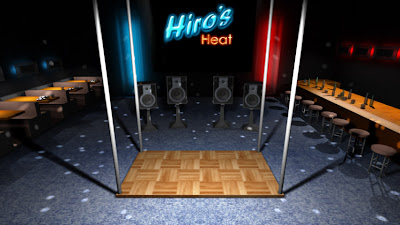
Below is an updated picture of the finished club scene. The file's are nearly done being rendered and I have completed a bunch more in Premiere itself. I hope to have some more test videos up soon, but it will have to wait until I finish a paper due tomorrow for another class... >_>

Monday, January 12, 2009

i just couldn't let it go...


i couldnt go to bed tonight without filling out that bar and those tables. i promised myself not to spend too much time on it, so i made a quick hot chicken plate complete with celery and some simple octagon glasses and beer bottles to spread throughout the room. i don't think i'll need any more garnishment for either the tables or bar, and my mind is now at ease. o_O


here is a high res render of the club scene to see the food and drink placement as well as a test of my disco ball lighting.

winter 09 quarter update

well it looks like i'm just going to continue my work as scheduled. plan is to be completed with the club scene by the end of next week so i can spend the rest of the time with overlay graphics and final touches. i've spent most of the winter break relaxing and haven't done much with the project. that said, i think i will still be able to complete the project within the given time frame.

as far as specifics go, all i need for completion of the club scene is an array of "atmosphere" lighting that can blink randomly enough to work while looped. modeling is more or less done other than the center section and minor details. if i want to get fancy, i'll try to make a fog or mist along the floor, but it would have to be done in multiple layers so it can be both in front and behind the dancers. it would look REALLY cool if i could pull it off, but only if i have the time.

i'm going to re-work the layering that i use in the .psd file for the overlay graphics just to make it easier for me to use in Premiere. like, i really don't need four separate layers for four static image elements for both players. i can consolidate them to a single layer.

Sunday, November 30, 2008

jumping cameras and tropical settings

Got some neat stuff accomplished recently. I finally got all the camera movements taken care of and rendered out the entire first scene. I have a video clip of that available here:


Also, while building the second new scene (tropical), I stumbled upon the paint effects tools and found out two things that I did not know before: 1) it's rediculously easy to use and 2) you can apparently convert paint effect meshes into polygons. When I saw they had palm tree meshes as one of the paint effect brushes, I proceeded to paint and convert a nice little island of trees that looks really, really nice:


I will likely run into some small looping problems with the trees, as the tree meshes sway naturally with some kind of artificial wind. I have no idea how to control it, so I will either just deal with it as is and have it jump every 4 seconds, or I found out that if you duplicate the objects, they lose their animating properties and remain entirely still. Which route I take depends on how badly the jumping is between clips... Also, I wanted something thrown on the right side, so I made and textured a little flag sign thing that says 踊り, which is Japanese for "Dance." I don't have the little fire tiki things holding up the stage yet, but it's getting late, and I don't think I'll be able to work on it at all tomorrow, so I'll post what I have so far.

Wednesday, November 26, 2008

Looping woes and fixes

I ran into headache after headache trying to manage all the syncing for the spinning fan in my camera loops. I wanted to use segments I could jump between easilly but ran into continuity problems left and right when dolly shots came into play. There would need to be the center loop, a shot dollying to the right, and then a loop on the right. Getting all that to sync up to the music while also keeping the spinning fan in proper motion illusion drove me absolutely nuts. After consulting with Professor Moore yesterday, I came to grips with my over-calculating OCD and decided to drop the fan entirely. I also took up the advice again today when trying to think of an alternative. After about an hour of not getting the cloud particles to properly look or animate like steam, I cut it entirely and just used a metal grate over the opening (to save time and effort, its the same transparent chain link fence texture used on the floor).

With that in place, it was just a matter of rendering out the camera movements. I wanted to set up a particular framework so that the other two scenes could be done much more smoothly. Essentially, I am going to leave all the camera and aim animations the same, as well as the position of the floor and replace everything around those elements to re-save into a new file. That way there is perfect continuity between location changes. I got out some old fashion paper and wrote down where I had the cameras place in terms of timeline frames:

1-40: Drop down intro
67-79: Dolly shot from center to right
79-91: Dolly shot from right to center
91-103: Dolly shot from center to left
103-115: Dolly shot from left to center
116-235: Center loop (4 seconds)
236-356: Right loop (4 seconds)
357-477: Left loop (4 seconds)

About halfway through notating frames, I realized that the start and end frames were in identical locations to the loops. So I cut one frame off each end of each of the dolly shots (68-78, 80-90, 92-102, 104-114, respectively) so that they would fit nicely into the loops and there wouldn't be any potential stutter when switching between clips.

So with this in place, I can delete all external items (besides camera/aim and floor) and replace them with the other setting(s) and re-save them under the appropriate names and such.

WHEW... deep breaths...... OCD OCD OCD OCD.......

Wednesday, November 12, 2008

Footage shot, test composite made

Got the footage all shot yesterday after a good hour and a half of setup. As expected, it took quite a bit longer than I had planned, and I ran into more than a few hiccups here and there. First issue was the lighting. I have two light kits, but I was using the outside light from the garage door as a third source. As the day went on, the earth apparently turned and the light was encroaching on the screen. So throughout the afternoon, I had to lower and lower the door while upping the exposure to compensate. It worked out well in the end, and we got all the shots we needed though.


As for the content, I had originally planned on using a multi-camera setup to record the front, and either side about 30º off center. But I didn't have enough horizontal green screen space to do so. Luckily, I can just simulate the change in direction in Premiere. It will look similar to the flat characters in Parappa The Rapper; the first big mainstream music game available for PlayStation.

Anyway, I had been working on one of the 3D stages, and wanted to test the footage out, so I threw together a quick little keyed composite. Its still a bit crude and missing most of the graphics (as well as needing tweaking on camera angles and looping problems with the render clip), but I wanted to make sure the footage all worked so I wouldn't need to re-shoot anything. I uploaded that short clip to youtube:


Youtube doesn't seem to make good sense of the widescreen render, but it will work for the final medium on DVD.

For comparison, here is a video taken straight from the actual game that I am trying to pay homage to.

Tuesday, November 4, 2008

At my wit's end!

First of all, my work had scheduled me to close on Wednsday, thus nullifying my ability to shoot that night. But it doesn't seem to matter much anyway, because when I went in today to change my reservation from tomorrow to Friday (when I am scheduled to open, and will be free in the afternoon), I arrive to see this:


So what this means is not only did something happen to my reservation for room 140 (the blue screen room), someone else seems to have reserved all time slots for the following three days; including Friday. I am sick and tired of dealing with this facility and I will no longer be using it. After my final class today, I am stopping by a fabric store to pick up some chroma green screen fabric and will shoot it in my garage. I have a lighting kit and I am using my friend's professional camera anyway, so I don't think it will be that bad.

I have been putting off building the 3D models for the scenes, as I was assuming to have my shooting done and would be working on that instead. I did spend a small amount of time preparing the 2D graphics and animating them to the music. I have a simple beat blink that is synced pretty well with the music, but nothing noteworthy enough to render out and upload to youtube.

As far as the 3D models are concerned, I have some rough preliminary sketches of the three different scenes, and I designed them as such so it would be simple for me to build in 3D. I will begin modeling the scenes probably tonight after watching election results. I should be able to get at least one of the scenes done by tomorrow morning before work.